
Start with a short practice route
This is the standalone 3D version of PokeBrawl; a browser pixel game's controls do not apply here. Open Training and learn movement, camera and dodge with one fighter before changing a whole team. Then read each selected move's reach and cooldown, try it by itself and check that your bindings feel comfortable.
Those three steps keep the first session manageable: identify the right project, control the character and only then customize attacks. The current developer README documents the actions below and says every key can be changed in Options, also from the pause menu during battle. This page combines controls and moves because knowing a button is only useful when you understand the action behind it.
Use the default moves first if the selection screen feels unfamiliar. A recognizable Pokémon name does not tell you how fast its real-time movement is, how far its melee attack travels or how its projectile aims. Open the move details in your installed build rather than importing assumptions from the turn-based games. Any practice routine here is a learning suggestion, not a tested competitive build.
Controls
The table separates the official README mapping from bindings observed in a local Windows v0.16.16 inspection on 2026-11-28. The inspected EXE matches the SHA-256 of the official release asset. Saved controls can be customized: these observations are not proof of universal defaults. Options is authoritative for your installation; the official repository remains the source for documented controls.
Developer trailer showing real-time 3D Pokémon arena battles, movement and attacks.
This is a historical trailer. Pokémon, form and arena totals shown in it may be older than the current repository. The reviewed README reports 352 Pokémon, 59 Mega Evolutions and battle forms, and 13 arenas (last checked 2026-11-28).
Clicking Play loads an external YouTube privacy-enhanced player. The video is hosted by YouTube, not this fan guide.
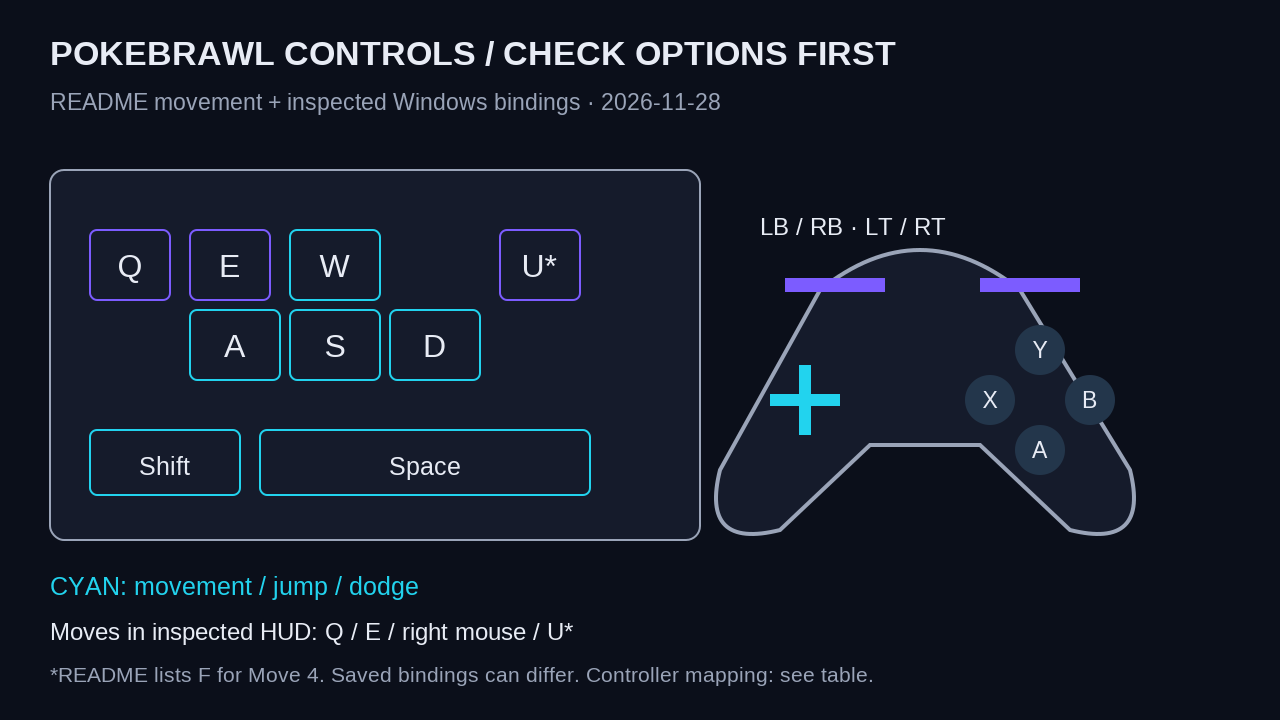
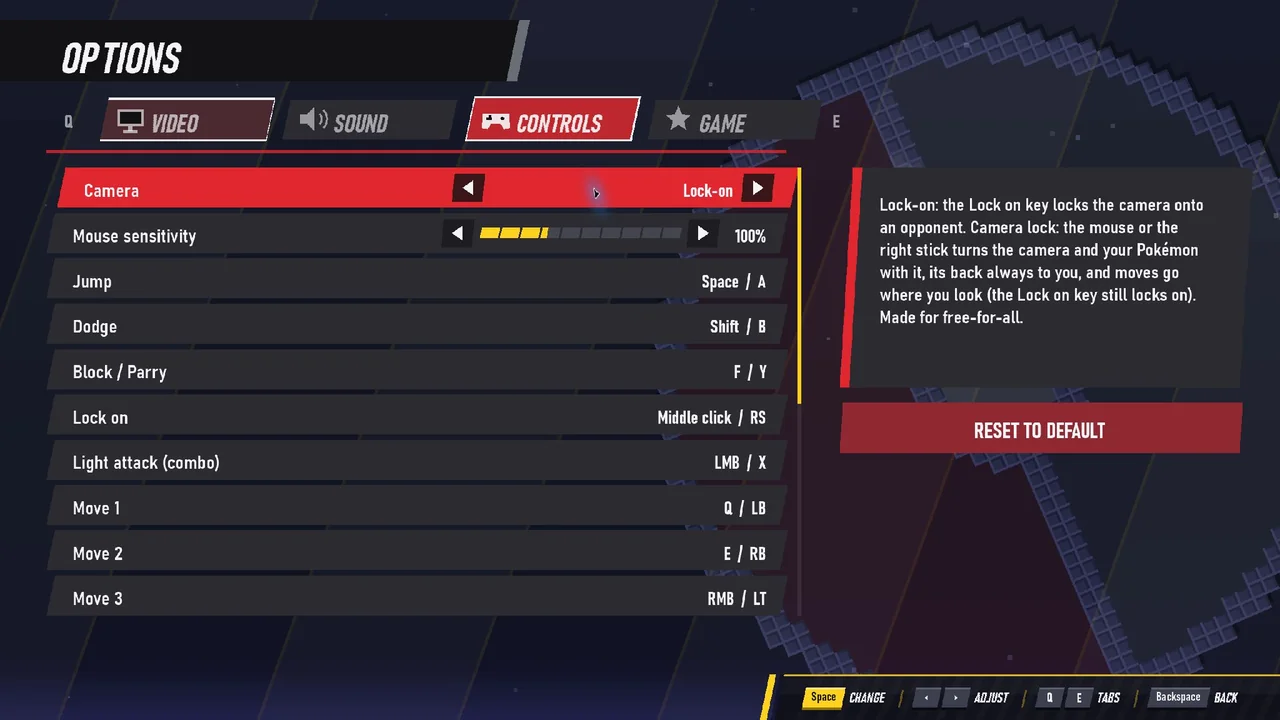
| Action | Keyboard / mouse | Controller and source |
|---|---|---|
| Movement / camera | WASD / mouse (README). | Left / right stick (Xbox and PlayStation, README). |
| Jump | Space (Options and README). | Xbox A (Options); PlayStation ✕ (README). |
| Dodge | Shift (Options and README). | Xbox B (Options); PlayStation ○ (README). |
| Lock-on | Middle click (Options); Tab also listed in README. | Xbox RS (Options); PlayStation R3 (README). |
| Light attack / combo | Left mouse button (Options). | Xbox X (Options). PlayStation equivalent not recorded in the reviewed sources. |
| Move 1 | Q (Options and README). | Xbox LB (Options); PlayStation L1 (README). |
| Move 2 | E (Options and README). | Xbox RB (Options); PlayStation R1 (README). |
| Move 3 | Right mouse button (Options and README). | Xbox LT (Options); PlayStation L2 (README). |
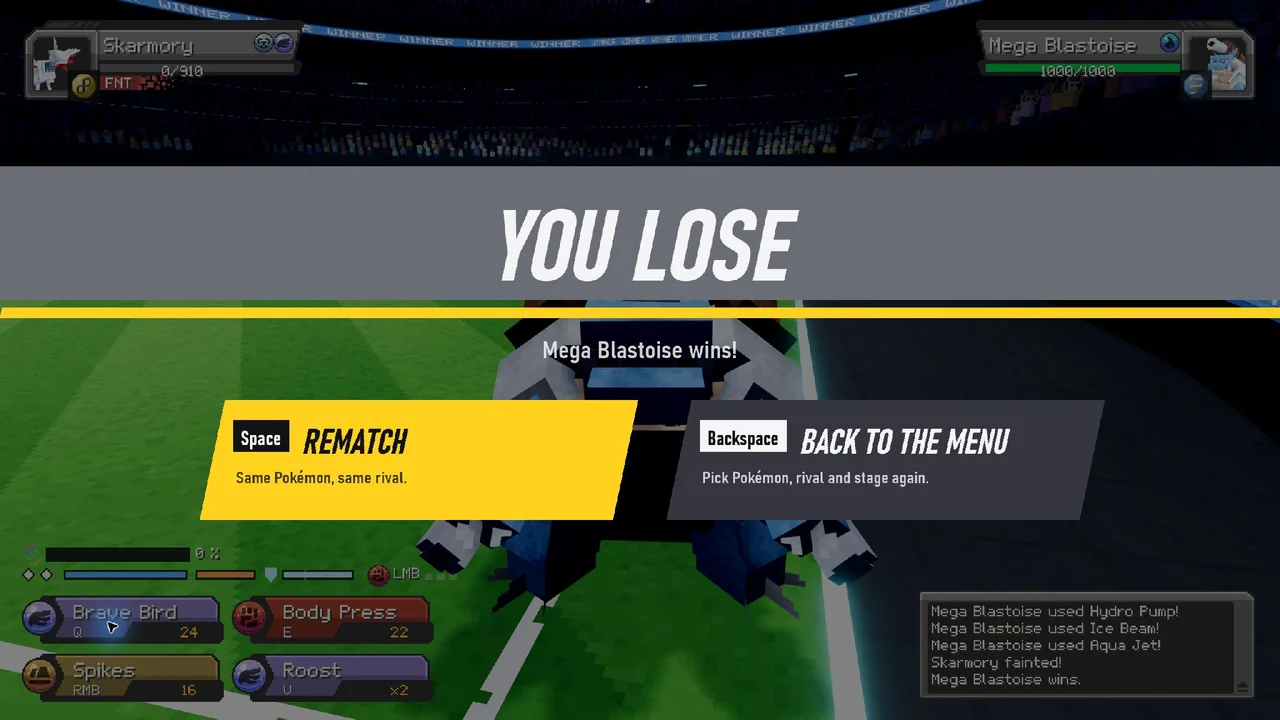
| Move 4 | U in the inspected battle HUD; F in the README. Check your binding. | Xbox RT / PlayStation R2 (README); this row was not visible in the inspected Options view. |
| Block / parry | F in inspected Options. The README describes the mechanic but omits its binding. | Xbox Y in inspected Options. PlayStation equivalent not recorded. |
| Switch Pokémon | T (README; not verified in this local session). | README: Xbox Y / PlayStation △. Current controller binding not verified; inspected Options uses Y for Block. |
| Mega Evolution | X (README; input not verified in this session). | Xbox X / PlayStation □ (README). Current controller binding not verified. |
| Transform (Ditto) | C (README). | No controller mapping documented in the README. |
| Zoom | Mouse wheel (README). | No controller mapping documented in the README. |
| Pause / settings | Esc (README). | Xbox Menu / PlayStation Options (README). |
Last checked 2026-11-28. “Options” and “HUD” mean the inspected local build; “README” means the official controls table. No gamepad was physically tested.
If an action does not respond, open the binding list before assuming that the keyboard or gamepad failed. A changed key, an unavailable move or a transformation condition can look similar from outside. Test movement and camera separately, then lock-on, then one move button. Keeping those checks separate makes it easier to report an actual input problem.
Moves and the four move slots
The developer describes four selected moves and an ability chosen from what that Pokémon can learn. That means the slots are not permission to equip any attack in the entire game. Read the available options for your chosen fighter, including power, cooldown, reach and timings. Keep a move's actual behavior separate from its type label: a Fire attack can still ask for a different distance or aiming method from another Fire attack.
As a practice framework, look for answers to different situations: an option at range, an option when the opponent is close, a way to reposition if your available learnset offers one, and a control or utility choice if documented in its move details. These are roles to think about, not a claim that every Pokémon has one move in each category. Leave a slot unchanged when you do not yet know why a replacement helps.
A long-range beam can be useful for learning aim, but do not assume it behaves like a homing ball. The current README distinguishes homing projectiles, aimed beams and streams, and melee moves that dash toward a rival. Watch what the move does before following it with another input. If a missed attack leaves you exposed, note its recovery and distance instead of simply repeating it faster.
Lock-on helps track a chosen target; it is not a guarantee that every attack lands. The original developer's demo instructions explain that free-camera attacks follow the camera direction and that streams are aimed manually. Those details describe the documented demo, so verify their current behavior in Training. Avoid copying the browser pixel version's hold-to-charge commands into the 3D game just because both use the PokeBrawl name.
Mega Evolution has a separate condition and input in the official instructions. Check your fighter's available forms before making it the center of a moveset. The pokebrawl pokemon list lets you search the developer's names, types and form labels on one page. It deliberately leaves recommended competitive positions as not documented in the official README (checked 2026-11-28) when no tested, official role is documented.
Beginner mistakes
- Changing everything before learning one attack. Keep a familiar set while you identify movement, reach and cooldown. Replace one slot at a time and decide what new situation the replacement is meant to handle.
- Using lock-on as a substitute for aim. Notice whether your move is a homing projectile, a beam, a stream or a close-range dash. Practice the corresponding camera movement and distance rather than treating all ranged attacks as identical.
- Troubleshooting input before checking the build. A different version or another PokeBrawl project can explain a mismatched guide. Compare the installed tag and Options bindings, then record the action that actually fails.
When you move online, first establish that both players can enter the same documented format on matching versions. A connection problem and an unfamiliar move should not be investigated as one issue. The pokebrawl multiplayer guide covers the confirmed cross-platform statement and marks undocumented local or team-mode details clearly.
Sources: current official controls and feature list and original developer's demo battle explanations. Last checked 2026-11-28.