
Compare the project before installing
The PokeBrawl name can point to different software. This fan site covers the standalone 3D download built in Godot, while a separate pixel arena game runs in a browser. Cobblemon appears in the same searches because it is credited as a source of models and other resources, but Cobblemon itself is a Minecraft mod. Those are three search directions, not proof that every mention describes a separate PokeBrawl release.
PokeBrawl 3D — this guide's game
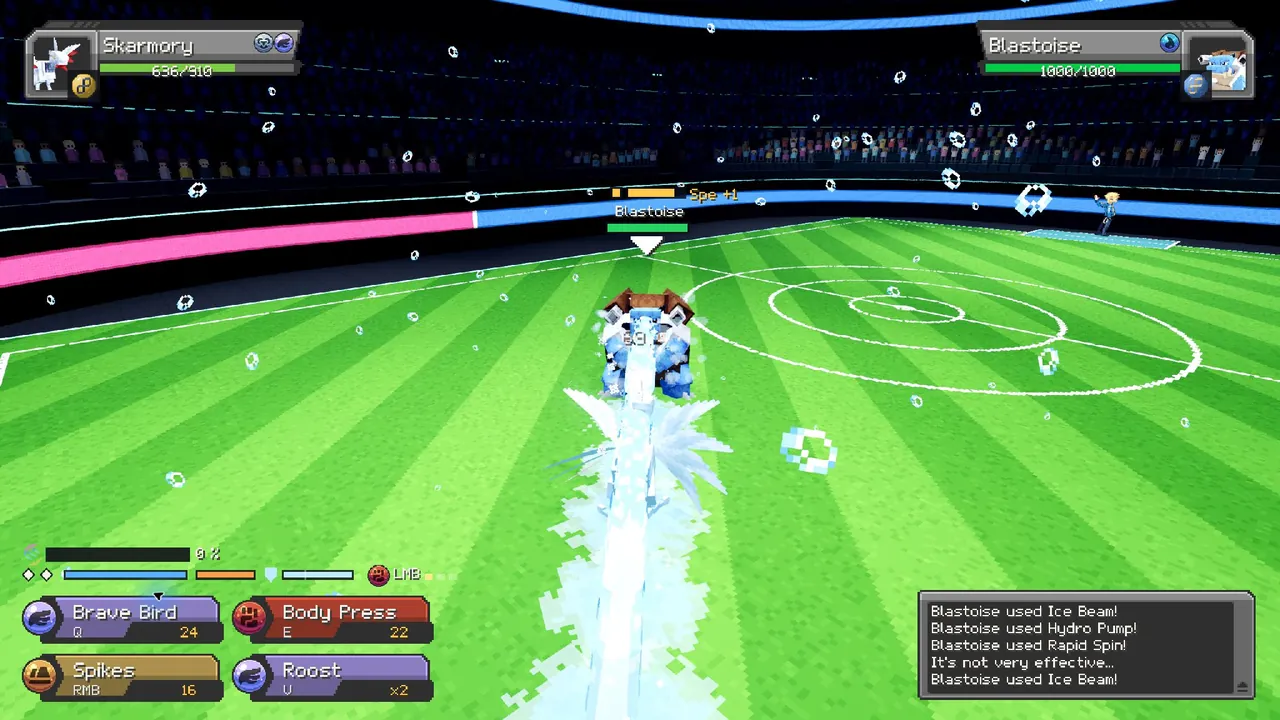
- Download: standalone build.
- Platforms: Windows, macOS and Android.
- Presentation: real-time 3D arena battles.
Screenshot captured by pokebrawl.lol in PokeBrawl v0.16.16.
Browser Pixel PokeBrawl — separate project
- Download: runs in a browser.
- Platform: a compatible web browser.
- Presentation: pixel graphics.
Original illustration, not this project's screenshot.
Identify a project by its distribution, presentation and source. Does the page ask you to download a platform build, load a browser play screen or install a Minecraft mod? Those actions lead to different instructions and different compatibility expectations. A shared Pokémon name, familiar creature model or word “online” cannot settle the distinction.
| 3D download version | Browser pixel version | Cobblemon / Minecraft direction |
|---|---|---|
| Online? Official README lists online 1v1 and free-for-all. | Online? The external page offers multiplayer rooms. | Online? Follow the specific Minecraft server and mod setup; it is not a 3D PokeBrawl room. |
| Download? Yes, a platform build. | Download? Browser play is offered; no 3D package is needed for that route. | Download? Minecraft and a compatible mod installation are a separate process. |
| Platform Windows, Mac and Android are documented in the reviewed README. | Platform Browser-based; full device support is not documented in the reviewed project sources (checked 2026-11-28) here. | Platform Check Cobblemon's own current requirements. |
| Graphics Real-time 3D models and arena camera. | Graphics Pixel sprite arena. | Graphics Pokémon integrated into Minecraft's world. |
| Roster Current README reports 352 Pokémon; forms are a separate category. | Roster A verified total is not documented in the reviewed project sources (checked 2026-11-28) in this guide; use that project's own list. | Roster Depends on Cobblemon version and add-ons; not interchangeable with the 3D game's count. |
Last checked 2026-11-28. The 3D count comes from the developer repository; it does not describe either of the other columns.
Check the account as well as the game name
| Account or link | Which project? | What to watch for |
|---|---|---|
| @Poke_Brawl on X | Its profile identifies a PokeBrawl Pixelmon server. | A Pixelmon / Minecraft server is separate from the standalone Godot 3D game. Do not also assume it is the browser pixel brawler. |
| @PokeBrawls on YouTube | A similar-name channel, distinct from the verified trailer channel @PokeBrawl-Official. | Do not treat the matching name or a subscriber count as proof that it is the 3D developer's channel. |
discord.gg/mnW7ghU | An older invitation linked in the Pixelmon server account's posts. | Not the 3D project's invitation. It was not confirmed active at this review; use the developer-linked invite below for the 3D game. |
| 3D project Discord YouTube @PokeBrawl-Official TikTok @pokebrawl.official | The 3D fan game's project channels. | The GitHub README and trailer identify this Discord. The YouTube trailer credits xjoje6 and kusho; the TikTok profile links the same Discord. “Official” here refers to the fan game's developers, not Pokémon's rights holders. |
A matching name does not mean a matching project. Check the engine, platforms and the date of Pokémon counts against the developer's repository before following an account or downloading a build.
Account identities checked 2026-11-28 against the linked profiles, the developer's trailer and the developer repository. Follower and video totals are omitted because they change.
If you wanted to play in your browser
Use the browser project's own play page rather than installing the standalone 3D game. The external site Poke Brawl browser pixel game (external site) identifies itself as a pixel arena brawler and presents browser play and multiplayer-room options. Following that link leaves this independent 3D guide. It is a different project, not a mirror for a 3D installer.
A browser project's keyboard layout belongs to that project. Do not copy its attack, dash or guard inputs into the downloaded Godot game without checking the 3D build's own Options menu. The same applies to browser room codes, account progress and Pokémon totals. No shared save system or compatible lobbies between the two projects were established in the reviewed official 3D sources.
“Online” is especially ambiguous in searches. Sometimes it means a game that runs in a web browser; sometimes it means network matches inside an installed game. If a friend says “play PokeBrawl online,” ask which presentation they see and where they launched it. Comparing the URL or release repository is quicker than diagnosing a room code from the wrong game.
If you arrived from a video, check its description and date. A moving 3D camera and native game window point toward the download project, while a sprite arena within a web page points toward the browser route. A title without a source link is not enough evidence to choose an installer.
If you came here looking for a Minecraft mod
The standalone 3D game is not a Minecraft mod. Its developer credits Cobblemon models, animations, textures and other resources, alongside additional artists. That explains the visual connection and search overlap, but it does not change the software you need to install. The reviewed 3D instructions distribute Windows, macOS and Android builds rather than a Minecraft mod file.
For the actual Minecraft project, use Cobblemon's own website (external site) and follow its current installation requirements. That direction is for Cobblemon itself. A specific community server or modpack using the PokeBrawl name would need its own verified instructions; no such package is established by this guide, and we do not recommend a guessed download.
For the standalone arena game, return to pokebrawl download. Read pokebrawl 3d if you want to understand its real-time movement and four move slots first. Neither route requires treating this fan site as the developer or as an official Pokémon service.
The practical rule is to keep sources with their projects: 3D builds and release tags from the 3D developer, browser controls from the browser project, and Minecraft setup from Cobblemon. This prevents a correct instruction for one program becoming a misleading instruction for another.